A counter. xD

Saturday, 27 July 2013

iPhone 5S

It is with high certainty that the next flagship iPhone will be released this end-year. There have been many rumours about the alleged bio metric scanner, and the bigger budget iPhone. This post may define what could be potentially iPhone 5S.

iPhone 6 rumors.

This alleged flagship phone has a whopping 5.7-inch Full HD Retina Display (1920 x 1080 pixels) at 386 pixels per inch , which is substantially higher than the current Retina Display present in iPhone 5 (326 ppi).

Sources claimed that iPhone 6 is powered by an A7 quad-core processor and running the yet-to-be-released iOS 7. The phone’s dimensions are shared below:
  • Height: 151.8 mm 
  • Width: 80.5 mm 
  • Depth: 7.6 mm 
  • Weight: 180 grams 

For some people, it is possible to tell the difference if we were to sit down and study a 1080p display and a 720p display, side-by-side.
Apple is expected to release two versions of the handset toward the second-half of the year -- the "iPhone 5S, the 2013 flagship and a budget version of the iPhone in plastic casing, to stay competitive in global smartphone market, which is currently leading by Samsung.


Thursday, 25 July 2013

Latest Tech Addiction

Smartphones are the latest tech addiction for almost everyone. It is so ingrained to more lives that we are unwilling to put down even in throes of passion.

According to survey done by Jumio, a US mobile-payment and identity-verification company who polled 2021 US adults, 1,102 of whom were smartphones users. There was a shocking revelation that 72% percent of the respondents that they usually do not be more than 1.5m away from  their smartphones.
Furthermore, almost one in ten admitted using their phones during sex. The increase in fatal traffic accidents should be affected by  the huge majority (55%) of respondents admitted the usage of phones while driving.

Consequently, it will lead to personal fears and concerns that the phone is in strangers' possession. 6 in 10 have fear in losing personal information.

However, there is a significant increase in meddling with other's phone. Thus, there is sufficent evidence to support that people should never leave their phones!

(Source: MyPaper, July 18 2013)

What are your views? Tell us, we want to know your comments!

Wednesday, 24 July 2013

Future of Android, Google Android 4.3 JB

Some of the statues at Google
Android has came a very long way from its humble beginnings with the T-Mobile G1 back in 2008. From the initial unsightly user interface of Android 1.5 Cupcake to the stylish UI of Android 4.2 Jelly Bean. Google will release at least 1 major Android update every six to nine months. With Android 4.2 released last year at a formal Google Event, which was cancelled unfortunately due to Hurricane Sandy, it was released in a press release page on 29 October. This means that there would be an upcoming refresh to the Android ecosystem coming soon. With the upcoming Google Android and Chrome event in a few hours (24 July 2013, 9AM PT/12PM ET), we expect to see a new version of Android as well as the latest device to join the Google Nexus family

Android 4.3 Jelly Bean
It is widely believed and hope that the next major version of Android, 4.3 Jelly Bean, which is an incremental update to the existing Android 4.2 OS, will be announced at this event. Android 4.3, which has been leaked on some devices such as Nexus 4 and the Google Play Samsung Galaxy S4. Android Central has a nice video made on Android 4.3 on the Nexus 4.

And here is a review of Android  4.3 on the Galaxy S4 Google Play Edition


Some of the changes that will be coming in this new version is not really all that evident. Most of them are under-the-hood changes as well as for developers. But there are some pretty cool features arriving for end users.

Phones and Messaging
  • By pressing menu in the phone app, you can now add two-second pauses in your dialling string (denoted by a comma) or longer waits (denoted with a semicolon).
  • In the settings of the Phone app, you can now enable dial-pad auto complete and change the DTMF (dial tone, multi-frequency) tone lengths.
Developers
  • Multiple options under "Monitoring > Profile GPU Rendering" as seen in a Google I/O Video. It lets you view a graphical representation of the time taken to generate a frame, and see whether you're hitting the 60 frames per second target. This will allow developers to create smoother applications
  • New debug options for the new non-rectangular clipping feature. This is a new graphical capability for developers in Android API Level 18
  • A new option to "Use experimental WebView" - this likely changes the browsing engine used to handle websites within apps, though it is currently unknown what exactly it does
  • There is a button that allows you to "Revoke USB debugging authorisation". This deletes the RSA key generated for USB debugging authorisation from the device itself, which is previously done from the computer.
Under the hood
  • New feature, "android.hardware.bluetooth_le" listed in the Android System Info application, which suggests that Bluetooth Low Energy support is available in Android 4.3.
  • Bluetooth tethering will be available for the Galaxy S4 Google Play Edition.
  • New check box under Advanced WiFi settings which allows Google's location service to scan for WiFi networks even when WiFi is turned off and not being used for wireless networking, which is likely part of Google's new approach to battery-friendly location services.
Others
  • A new camera app available for all Nexus device that is currently only available on the Google Play edition of the Galaxy S4 and HTC One.
  • Long, multi-word SSID names now wraps properly down to a second line in the quick-setting pull down
  • When a screen shot is taken and shared via email, the Subject field is automatically populated with the date and time of the shot.


Google 2nd-gen Nexus 7
Another main feature of this event is the highly anticipated refresh of the Google Nexus 7. Its rumoured to come with the Qualcomm Snapdragon S4 Pro chip (or Snapdragon 600), 7-inch display, a whooping 4GB RAM (holy!), 5MP rear camera, 2MP front facing camera as well as a 3950 MaH battery to power it. More details will come when it is officially released.

And now... Some pics of the Nexus 7 2nd gen:


So... Android users, what do you anticipate and hope for release in this Google Event? How do you feel about these 2 possible releases? Comment and discuss in the comments below!


Lethality of Non-Genuine Phone Charging Plugs?

Hi guys! I will be talking about phone charging again...

So when I was scrolling through my Facebook posts, I saw one post which caught my attention.

"Deadly fake iPhone charger accidents continue to plague thrifty users"


At first, I was relieved that I don't own such a charger. But then, it came to me that I HAVE used charging cables not supplied from my phone vendor. While I did not think of what are the risks of using those kinds of accessories in the past, I think it is time for me to do some soul searching.

I did some searching on the Web to find out incidents when you use fake chargers. 
Here's a relatively recent incident in my hometown, Singapore, in May 2013.

The interior of the
seemingly "exploded"
charger socket.
Source: 
http://blog.nus.edu.sg/
linus/2013/05/14/fakeusb/


In the National University of Singapore (NUS), one student charging her phone noticed smoke emerging from her phone charger. Luckily, she reacted quickly and turned off the main switch in the nick of time. 

When she tried to pluck the charger out of the socket, the charger casing gave way - the other half of the charger plug was stuck in the socket. 
The interior of the charger was blackened, and parts of the electronic circuits had disappeared, apparently due to the extreme overheating of inferior materials used to make the inferior charger. 

Here are 2 others incident in China.


apple.jpg
The man's iPhone and the charger at scene of incident.
Source: 
http://www.scmp.com/news/...&utm_medium=twitter
A Chinese national is left in a comatose state, struggling to stay alive after receiving a heavy electric shock when he tried to charge his iPhone with an unauthorized charger.

He was holding his iPhone on his left hand, and inserting the phone charger into the electrical outlet with the right hand. He then suddenly fell to the floor twitching. His sister had helped to unplug the charger from the outlet, but she also felt a mild shock. She observed foaming from her brother's mouth


cctv.jpg
A screenshot by CCTV (China Central Television) of
the iPhone and the charger.
Main source: China Central Television
Source: 
http://www.scmp.com/news/...have-been-using-fake
A flight stewardess was charging her iPhone 4 when she picked up the call while the phone was still charging, and got electrocuted. Reports infer that she might have been also using a fake charger.


In these cases, the victims are all suspected of using non-genuine phone chargers.
Yes, using fake phone chargers can be scary, dangerous AND lethal. Why is it so?
This is because inside a non-genuine charger, some IMPORTANT SAFETY PARTS are missing. Sometimes, the charger may produce more volts than usual to charge the phone itself. If it exceed the maximum output, who knows what danger may happen?

Why can't we spot those fake chargers easily?
Some fake chargers are printed with a safety mark like genuine ones. We cannot possibility be able to dismantle the charger on the spot (when you are buying it) to check its interiors, can we?

Why are people still buying them?
Fake chargers are "real" chargers at up to 90% off the cost price of a REAL, GENUINE charger. A real charger may cost 25 bucks, a fake one may cost 5 bucks. Both of them has the same purpose. Which one would you buy?

Many people would say, "Go for the cheaper goods! It is cost efficient and long-lasting!". How true is that? 
"Oh my... 25 bucks. I'll go for the one that costs 5 bucks."
There is a saying, "Do not judge a book by its covers."
Definitely that 25 bucks may be a tad expensive, but buying a more expensive product that is provides more safety than the one that costs 5 bucks and provides little or even zero safety is more worth it, right?

A blogger, Ken Shirriff, shares with all his experiences with USB chargers.
I decided to share his blog here because he gives detailed and well-explained procedures on genuine and counterfeit USB chargers. Here's 1 quote from his blog:
Stay away from super-cheap AC adapters built by mystery manufacturers. Spend the extra few dollars to get a brand-name AC adapter. It will be safer, produce less interference, and your device's touchscreen will perform better. 

Please leave comments if you have any questions, thank you!

Nokia's Latest Flagship -- Lumia 1020

It was once the world's largest mobile phone maker for almost a decade, but has since declined since 2010. After Samsung's rapid market domination , Nokia has struggled to stay afloat even with the collaboration with Windows Mobile. It currently owns less than 10% of global phones sales, as compared to over 40% for Samsung. Thus, the latest flagship of the latter, the Nokia Lumia 1020 introduced recently, is to allow Nokia to gain significant domination in the high-end market.

Nokia Lumia 1020 Specifications:


Connectivity: 4G LTE
Dimensions: 130.4 mm x 71.4 mm x 10.4 mm, 158 g
Display: 4.5 HD AMOLED touchscreen,  1280 x 768 pixels (332 ppi)
                         (Corning Gorilla Glass 3)
Memory: 2 GB RAM, 32 GB Internal Storage
Camera: (Primary) 41 MP with Carl Zeiss optics, optical image stabilization, 
                 autofocus, Xenon & LED flash
                 (Secondary) 1.2 MP, 720p@30fps
Video: 1080 p @ 30 fps
OS: Microsoft Windows Phone 8
Processor: 1.5 GHz dual-core
Battery: 2000mAh
Source:(http://www.gsmarena.com/nokia_lumia_1020-5506.php)


Its main features is its 41MP Carl Zeiss optical lens Camera, that provides stunning image quality that is only comparable to the older Nokia PureView 808 which is running Symbian OS. The image quality is even better than some of the cameras available in the market, providing it with a huge head start over the other flagships. Moreover, Nokia has been known for their excellent phone cameras over the last few years, enabling this phone to be catered to the vast majority.

However, the Windows Phone 8 Operating System used has been criticised for its lack of apps and customisations that are incomparable with other popular OS (iOS, and Android OS), thus allowing it lose the competitive edge in the market.

In my opinion, although the Nokia Lumia 1020 will allow Nokia to increase its global  phone market, it will be significant but not rapid, simply because it is not a game changer. 

What are your views on Lumia 1020? Share it with us!


Tuesday, 23 July 2013

Charging Your Phone (Part 2: To Charge)

Hi again guys! Sorry for the very late Part 2 post! 

So, if you have read my earlier post on http://allthingsphoney.blogspot.sg/2013/07/charging-your-phone-part-1-definition.html, I was discussing the definition of "low battery" and what are some common definitions of it by people. 

Well... Let me admit that I am one of them. Hehe... Charging my phone when it is not actually low battery, charging my phone when the battery is at around 90%... All those.

Some of us may have such a habit. But if you retain this habit for a long period of time, some effects may occur to your phone...

Notice saying to plug to charger on an iPhone.
Source: http://www.apple.com/uk/support/iphone/assistant/phone/
I've experienced it before. There was one time, I was heading to sleep. I fully charged my phone to 100%, closed all the applications that were still running, locked my phone and left it to idle mode. It was like 1 a.m. when I slept, then when I woke up at 7 a.m., I tried to unlock my phone, but a notice on the phone screen appeared saying that I have to plug in to my charger to switch my phone on, as with the image in Part 1.

Well, that's something that may happen if we charge too much and inefficiently at the wrong times...


A typical portable battery charger that can hold up to 6600mAh.
Source: 
http://belsion.en.made-in-china.com/productimage/...PSP-GPS.html
Sometimes when we go out, we are just afraid that our gadgets (cellphone, tablet computers, etc.) may run out of battery, and we are unable to charge them without the chargers or sockets (except in some cafés). It may be good to bring a portable charger that is capable of storing a capacity that can recharge your gadgets to full when it is genuinely at low battery.


Now, where should you place your phone when it is charging? 

In a previous post by my friend, it is known that all phones give out radiation, and phone users are 2.5x more prone to developing brain tumour, right? Scary, ain't it?
So when you charge your phone when you're sleeping, it is best to keep at least 1.5m to 2m away from your phone. Asides from radiation, this is also bad for health (when you charge, the phone emits energies that are deemed to be harmful to your body).


What other ways can we adopt to help out in phone charging?
In the App Store or Google Play store, you can search for many applications that aid in phone charging. 
Typical UI of Battery Doctor
Source: http://www.androidauthority.com/battery-doctor-app-review-117716/
I use an application called Battery Doctor. Many useful functions. Let's say, it that can detect how long you charge your phone for, what is the percentage of battery left that you charged from, to the end percentage. It can also detect sometimes where you do a full charge, normal charge or over-charge. There is also a calendar to keep track when and what time did you charge for phone. 
There are a lot of many functions that I have not explored yet, so if you're thinking that you need help in phone charging, you may consider this app. I'll let you explore the app on your own.
There are many other apps in the stores that have similar functions, up to use to choose them. An application like this truly helps one in keeping track of charging records.


Other good tips:
1) It is never good to often charge your phone when it is not truly at low battery.

2) Avoid overcharging your phones - it may cause your phone battery get faulty -  the battery will deplete very easily.


3) When you feel that your phone is getting warm, it might be that it is overcharged for too long or it has been used too long without locking it. Disconnect it from the charger if you're charging it or turn the phone off, so that the phone may cool down.


4) Avoid taking the phone battery out when the phone is in charging mode.


5) If possible, use a genuine phone charger/phone cable.


Last but not the least, extended phone usage can cause the battery to deplete very fast. So do take note of this. 


And that's Part 2! Please comment below and share your views! Thank you!

Monday, 22 July 2013

Android Power Users: Root and Full Customisation of Androids Part 2


Google Nexus 4 by LG and HTC One
Rooting an android device varies with each model. In this post, I would be going through exactly how certain phones such as the Nexus and the HTC One is rooted.

================================WARNING================================
The following part will show you the steps on how to root a phone and is only meant for educational purposes. It is a process that people should NEVER ATTEMPT unless they have the experience and understanding of the process. There is a VERY HIGH chance that you might brick your phone if you do not know what you are doing. I am not liable for any problems that may occur should you follow this steps. Skip to the next red line to continue with the blog post.
========================================================================

Prerequisites:
ADB command prompt

  • Windows computer
  • ADB/Fastboot knowledge
  • ADB and Fastboot drivers installed
  • Micro-USB cable
  • Ensure that the phone has been properly backed up (Mandatory Factory reset during process)
  • HTC Unlock token (for HTC Devices)
Nexus 4
Fastboot command prompt
Left: Boot loader of the Nexus 4
Right: warning while unlocking boot loader
Ensure that USB debugging is enabled on your device. Then, launch a command prompt and navigate to where you have placed the ADB files. After which type in "adb devices" to ensure that your phone has been detected by the computer. If it is, type in "adb reboot bootloader" to reboot your device into fastboot mode. Afterwards, your device should be in the boot loader. In the boot loader, enter "fastboot devices". If your drivers are successfully installed, you should see your device ID in the command prompt. After which, type in "fastboot oem unlock"
to start the unlock of your device. A warning should pop up on your device, warning you about the implications of unlocking the boot loader, as well as the fact that data will have to be wiped. Use the Volume Up button to navigate to the Yes and use the power button to select. After a few seconds, your phone would have successfully been unlocked.

HTC One
Warning from HTC
Go to the HTCDev website and select your phone from the drop down menu on the right ("All Other supported phones" for the HTC One). After which, do a login/register into the website, a warning from HTC detailing what happens should you continue will pop up. Read the text carefully and if you are sure you want to continue, press the Yes button and accept all legal terms in the next pop up, then click "Proceed to unlock instructions". Follow the instructions on the site carefully and thoroughly. When you have submitted your unique device identifier token, check the email which you registered your account on. You should receive an email containing your unlock token along with further instructions on how to continue. Download the token (Unlock_token.bin) and place it in your fastboot/adb folder. Then, on a command prompt, type in "fastboot flash unlocktoken Unlock_token.bin" and accept the warning (refer to Nexus 4) on the phone. Your phone is now unlocked!

Root and Custom Recovery
After unlocking the phone, rooting is as simple as finding a zip file containing the SU binary of your phone (Google "root <device name here>" to get the file). And flashing it via fastboot or a custom recovery. To install a custom recovery, Google for a recovery image for your respective phone (Recommended: TWRP for Nexus 4 and CWM Touch for HTC One), download the recovery image into your fastboot folder, boot into your phone's bootloader and type in "fastboot flash recovery <name of recovery img>". You have now successfully rooted and installed a custom recovery onto your phone!

=============================END OF PROCESS=============================


SetCPU Main Screen
Now that you have rooted your device, here are 3 useful applications that rooted users can use.

1. SetCPU for Root Users
This is an extremely useful application that will enable you to control your phone's CPU, from its maximum/minimum clock speed, governors, setting profiles that will enable when you do certain tasks etc.

2. Root Explorer
Root Explorer
This is one of the best file managers available for rooted users. With it, you have full access to all of your file folders on your Android phone, Google Drive, Box, Dropbox and network (SMB) support, SQLite database viewer, Text Editor, create and extract zip or tar/gzip files, extract rar archives, multi-select, execute scripts, search, remount, permissions, bookmarks, send files (via email, bluetooth etc), image thumbnails, APK binary XML viewer, change file owner/group, create symbolic link, "Open With" facility, MD5, create shortcuts.

3. Titanium Backup
This is the ultimate app management application available. With this, you can backup, restore, freeze (PRO only) and uninstall any application on your phone, including System, Protected Applications, as well as applications on the SD Card. It also allows batch processing as well as scheduled backups. You can move all applications to the SD card and back as well as not stopping the application while doing a task. You can browse the data stored in each application as well as check the Play Store for more detailed information on the application

Titanium Backup
Rooted users, what are your most frequented application used? Feel free to comment and share in the comments section below.

How to secure and protect your phones? (*Last updated 22/7/2013 )

Mobile phones could do a lot of things now and great phones comes with great price. Some common tips are:
  1.  Lock your phones with a password or a pattern lock, best for both.
  2. Download app from reliable store like Google Play, Apple app Store, Windows Phone App Store.
  3. If you are checking your bank account, personal email or online shopping, please do not use public Wi-Fi. It is more secure to use you own mobile data to access any of those sensitive information.
  4. Lastly, always back - up your phone. (Either to your computer, thumb drive or Hard drive.) Before that... you could use cloud storage to store your data. Remember to use at least 2 cloud storage services.
  5. Many apps take your acknowledgement to access your files and settings. Do ensure that you use your GPS where appropriate as your camera will store the location where you took. Geotagging. Here is a video on how your information can be easily accessed using Facebook. https://www.facebook.com/photo.php?v=1383482928537091&set=vb.553885494621538&type=2&theater
  6. Check your application's permission to get your data.
  7.  It is important to keep your phones details like IMEI number, model name and number and etc. You could give this information to the police if you lost your phone. The police would be able to contact phone retails shop to keep a lookout on your phone and nab down the culprits.
  8. Avoid checking the time on your phones if strangers approaches you. You might seems relax while taking out your phone but you might not know how fast your phone would be snatch. (http://www.techhive.com/article/2027399/tips-for-securing-your-android-phone.html) 
  9. Install antivirus program in your phone.
  10. Lost your phone before? Get  LookOut before anything happens to your phone. However, Plan B will allow you to find your phone and download the app after you have lost your phone but must have your device registered with your Gmail. Phone must be android.

Additional Information that you could read on clouding (Bonus): 
Is cloud really safe? (Touch and Go Topic)
http://computer.howstuffworks.com/cloud-computing/cloud-storage3.htm
https://spideroak.com/privacypost/cloud-security/is-your-cloud-safe/
http://computer.howstuffworks.com/cloud-computing/files-safe-in-the-cloud.htm
http://www.bu.edu/infosec/howtos/how-to-safely-store-your-data-in-the-cloud/

If you want a answer from me on whether is it really secure? I would say no. The reason is being password can be hacked and you won't know whoever who has authorization rights and permission to do that. You could save some general and non - important files. Spend money and get a hard drive to store your data files.

Sunday, 21 July 2013

Android Power Users: Root and Full Customisation of Androids Part 1

Different skins of Android (from left to right: Sense 4 by HTC Coporation, MotoBlur by Motorola Mobility, TouchWiz Nature UX by Samsung Corporation)
Source: http://img.gawkerassets.com/img/17qwgbodw8nfzjpg/ku-xlarge.jpg
There are many smartphones running the Android platform made by the different manufacturers. And each manufacturer placed their own skin onto the phone in order to differentiate and attempt to outstand their phone from their competition. There is the "vanilla" skin from Google on the Nexus series, the "TouchWiz" skin from Samsung on the Samsung Galaxy series of phones, the "Sense" skin from HTC on the HTC Android line and so on. However, what happens if you like the phone, but dislike the OEM skin? Or if you're a power user that likes to have full control of your device? Well, on Android, there is a way that enables you to do either of that, and that method is known as rooting.

Logo of CyanogenMod 7
(Source: http://bit.ly/1aB0QHT)
So, what is meant by rooting in Android? And also, what is a power user? Rooting, is an process which grants the user global administrative privileges of the device, also known in the linux world as a superuser. With the superuser (su) permission on the phone, the user is able to modify and system files, customize and install custom recoveries and bootloaders, as well as load various "custom ROMs" that are created to completely change the look of your device. One popular custom ROM, is known as CyanogenMod, which
is a customized version of the AOSP version of Android.

Superuser command (su) allows access to
file locations previously denied
What is a power user then? Power Users in Android, are users who likes to control everything about their phone, such as how fast their processor should run, what system app is present, and so on. With root and su, power users are able to overclock their device to improve performance, underclock/undervolt their device to conserve battery power, view previously inaccessible files, remove unnecessary system applications/files that are previously unremovable, that is constantly taking up space, RAM and CPU time and so much more. The possibilities are endless with root permissions (su).

Unlike users of the Apple iOS or Microsoft Windows Phone, where the companies (Apple and Microsoft respectively) does not like or allow users to obtain such "root" privileges (commonly known as "jailbreak" on
HTCDev.com Official bootloader unlock tool for HTC Devices
iOS and Windows Phone), Google allows and encourages people who knows what they are doing (mainly power users), to unlock and attain such privileges (as shown by the easy way of rooting a Nexus, more details in Part 2). Their Nexus devices are locked and restricted solely due to the fact that they have to keep in mind and protect the general users from unknowingly messing up their phone. While in the past, the other manufacturers in the AOSP are against rooting, constantly trying means to prevent and patch up security exploits used by Power users to obtain root access on their phone. However, more and more manufacturers are loosing up on their policies over rooting, most notably manufacturers such as HTC and Sony, who have released official bootloader unlocking tools for people who wish to unlock and access all parts of their phones.

Warning from Google on unlocking
bootloader on the Galaxy Nexus
That being said however, Google, as well as the other manufacturers in AOSP, has a clause stating that users
will be voiding certain parts of their warranty (mainly the Software) in rooting their device. This is because each phone has been tested to ensure that the phone will not have software or configurations that may be detrimental to the phone. By rooting, the user is able to modify the software and configurations such that they might consequently corrupt their phones, with the worse case being a radio brick (caused by a corrupted radio image or corrupted radio partition). Because of the warranty void, the manufacturers are not liable for
anything that happens to the phone due to user modifications on the phone. This is used to protect the manufacturers from suffering losses due to having to replace phones that is damaged due to the user.

In the next part, we will be talking more in depth about to how to root certain devices with their respective unlocking tool, as well as some useful root applications available on the Google Play Store

AMOLED vs IPS LCD

The touchscreen is the most important component of all smartphones. Without this crucial element, all smartphones are just useless even if they are equipped with the fastest processors, 50 MP camera lens, wireless charging. Thus today, there is the discussion of the main types of smartphones screens that are widely available: AMOLED and IPS LCD.


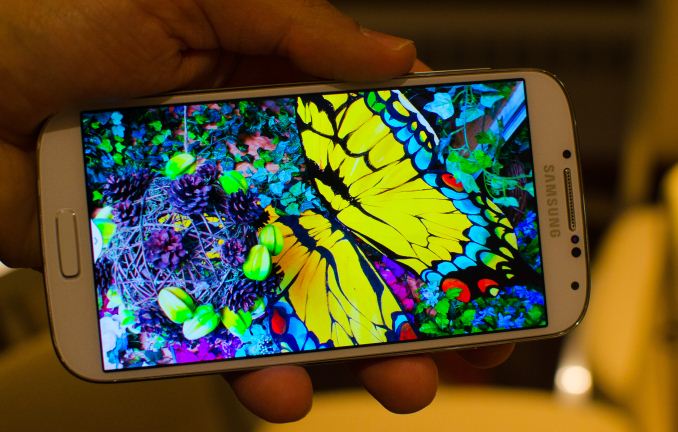
AMOLED             (Source: http://www.anandtech.com/show/6832/samsungs-galaxy-s-4-introduction-hands-on)

It simply stands for Active Matrix Organic Light Emitting Diode. It was widely introduced by Samsung in its flagship phones (Galaxy S, Galaxy S II, Galaxy S III, Galaxy S4), and supplied to other phone manufacturers (HTC, Google). It is praised for its ultra fast reponse time , significant low power usage without the need of back lighting, and mostly its representation of more vibrant colours than IPS LCD. 

However, it has drawbacks too. The organic materials used in AMOLED  are  more prone to degradation overtime, resulting in color shifts as one color fades faster than another. However, technology has been developed to compensate for material degradation. Furthermore,  PenTile technology is widely used to allow for a higher resolution display while requiring fewer sub-pixels,  resulting in a less resolution display as compared with a non-pentile display (IPS LCD) with the same resolution. Lastly, the production cost of AMOLED is still substantially higher as compared to IPS LCD.


IPS LCD                                      
It simply stands for In-plane-switching Liquid Crystal Display. It is commonly found in smartphones like Apple iPhone 5, Nokia Lumia 920, LG Nexus 4. It displays more  consistent and accurate color from a wide viewing angles as compared to its predeccsor TN-LCD.
It boasts a non-pentile screen, which increase the screen resolution because of the increase of sub-pixels. Moreover, it is less prone to degradation, which reduces the probability of colour accuracy overtime. Most importantly, it represents more natural colour images than AMOLED.

However, it lacks the higher colour saturation, contrast and response time that AMOLED has. 

Here is comparison between the two:


(Near Left : Galaxy S4 (AMOLED), Middle and far left: Apple iPhone 5 and HTC One (IPS LCD)
(Source: http://samsunggalaxy-s4.info/color-super-amoled-screen-samsung-galaxy-s4-very-natural_774.html)

Thus, what are your preference? AMOLED or IPS LCD? Please comment below to share your views!

Saturday, 20 July 2013

Useful Mobile Phone applications to increase your management and productivity (For Android Users only)

Just recently, I came across some websites about mobile phones' applications. I had decided to share some of the applications which I personally liked and why I liked it.
------------------------------------------------------------------------------------------------------------------------------------------------
AutomateIt  - Automate Your Droid: This app would allow you to set new rules which needs you to select a trigger, an action and enter details. There is a whole lot of trigger lists that you could use. For example, you selected SMS with Text Trigger. You set a SMS Text that you want to such as "unmute". Basically, when you send "unmute", this trigger will trigger an action to set your mobile phone's profile to silent/vibrate/normal (<-- you choose).

------------------------------------------------------------------------------------------------------------------------------------------------


MightyText: Tell your friends how you actually receive and send message through your laptops or computers.


------------------------------------------------------------------------------------------------------------------------------------------------
 Shazam: You had just listened to a song which you liked but you don't know the song title and artist? What to do? Use this app, its intelligence will tell you who is the artist and the song title. You could also preview the song or buy the song and stream lyrics.

------------------------------------------------------------------------------------------------------------------------------------------------
 Umano: This app would read to you news instead of you reading the news. Sick and tired of reading and reading? Close your eyes and relax while listening to whatever news you want to.
------------------------------------------------------------------------------------------------------------------------------------------------
 CloudOn: Trying to get things done without laptop around? Get this app on your Android phone and you will be able to perform your Microsoft Office skills on your Android phone. (Microsoft Word, PowerPoint and Excel)
------------------------------------------------------------------------------------------------------------------------------------------------
All the apps are free. Do try it, you will never know how good it is if you don't try.

Do you have any app in your mobile phones that are useful? Please share it with us by commenting below. Remember to share this post with your friends. This post will be updated as soon as we hear useful apps from you all (, and your name will be included).
Thank you!
------------------------------------------------------------------------------------------------------------------------------------------------
Credits:

All images are from GooglePlay.

Special thanks for TimeTech for sharing this wonderful and useful tips with us. Check them out: http://techland.time.com/2013/07/01/50-best-android-apps-for-2013/

Friday, 19 July 2013

Defining your future mobile phone

Source: http://www.ledfrog.com/content/images/2012/01/iphone-6-watch.jpg
How would most of us want our future phones to be? Personally, I don't really bother about the size of the mobile phones, provided that what function it provides. But the lighter the better, isn't it?

How about ... Holographic phone? You could have a much lighter phone and much interactions with your phone. You might consider that the Holographic phone comes with a headset and a special pair of glasses for individual interaction - and seen only by user rather than other people.

Well, we are already heading towards having such devices.  Google had just released their Google Glass recently. In future, Google would want to create and develop more of such devices with more of technology.

So what do you think such Holographic phone would ever be invented? 
Source: http://cdni.wired.co.uk/620x413/g_j/hologram_1.jpg
Please share you thoughts and comment about phones in the future. Remember to share it with your friends. This post will be updated if your comments are related and interesting (, and your name will be included).
Thank you!

Thursday, 18 July 2013

Charging Your Phone (Part 1: Definition of Low Battery)

Charging phones - ain't it something that everyone of us have to do at least daily or once in 2 days?
Oh no! Charge it before the battery runs out!
Source: 
http://howto.cnet.com/83...charged-on-the-go-with-powerbag/
Well, of course everyone has to charge their phones in order to use it. Go back home, you may just find your siblings, parents having their chargers plugged in and charging their (smart)phones. Go to your friends' house, they may also be at a state that they are charging and using their phone at the same time. Even better - charging the phone via the computer. 

Yes, charging phones is 100% essential you may say, but the problem is, how often must you charge it, so that your phone does not run out of battery that fast?

You tell me: "Oh. I charge it whenever the battery is low." That's true. But what is your definition of "low"? 
________________________________________________________________________
Here's what some people say about their definition of "low battery":
1) "Screw it! 1 bar of my battery is gone. I gotta charge my phone."

2) "99% battery life left... I will charge it to 100%"
*5 minutes of usage after 100% charged* "Oh darn. 95%. Let's charge it again."

3) One person's phone is at 100% battery life. He brings a portable phone charger with him whenever he goes out.
" I shall plug this in so that my phone will always be at 100% battery, never lower."

4)"Oh, it's 50% already? Oh well. *charges*"

While in fact, the definition of "low battery" is:
1) Whenever your phone sends a "help signal" - a warning that would state that there is low amount of battery remaining. 
"Help! I'm left with 10% of life!"
Source: http://greenmonk.net/2012/...tery-life/
2) You see on the battery bar (on iPhones), the bar is red.
Oh... 1%... Wait, isn't the phone supposed to self shut-down by then?
Source: 
http://www.flickr.com/photos/...8260301386/
3) You are unable to start your phone up and (on iPhones) it gives you a signal message that you must plug your phone into a charger to power it up.
Give me my daily energy! I demand it before I start up!
Source: http://www.apple.com/uk/support/iphone/assistant/phone/
Only under such circumstances (when they occur) should you start to charge your phone.
So, what is the actual and correct way to charge your phone? Stay tuned!